Workouts
Workout notation
The full syntax for typing running workouts in Runtool: intervals, paces, recoveries, warmups, and what gets filled in automatically.
Workout notation is the shorthand for typing a running segment as one line of text. Click a day on the Calendar and type the segment the way you would say it: 10x400m, 30min tempo, 8km easy. Press Enter and it becomes a segment you can see, with reps, recoveries and target paces from your zones filled in, which you can then adjust with the controls or reopen as text.
You never have to keep the notation around. It is how a segment gets written, not something kept alongside the workout afterwards.
This page is the complete reference: every piece of syntax the parser understands, and every rule it applies when you leave something out.
Basic runs
A run on its own is a distance or a duration:
| You type | You get |
|---|---|
8km | 8 km steady run |
6mi | 6-mile steady run |
45min | 45-minute run |
1h 30min | 90-minute run (units combine) |
10km easy | 10 km in Z1 |
30min tempo | 30 minutes in Z3 |
12km @ 5:30 | 12 km at 5:30 per km |
Distance units are m, km, and mi (also spelled meters, kilometers, miles). Time units are s, min, and h (also sec, secs, mins, hr, hours and similar). Pace targets accept both /km and /mi. Everything is displayed in the workspace's unit system.
A run with no pace or effort defaults to Z2. That is not the same as easy, which names Z1: leaving the pace out says you have not decided, not that you want it run easily. See Intensity.
Intervals
Intervals are reps x distance or reps x duration:
10x400m: 10 reps of 400 m5x1km: 5 reps of 1 km6x3min: 6 reps of 3 minutes
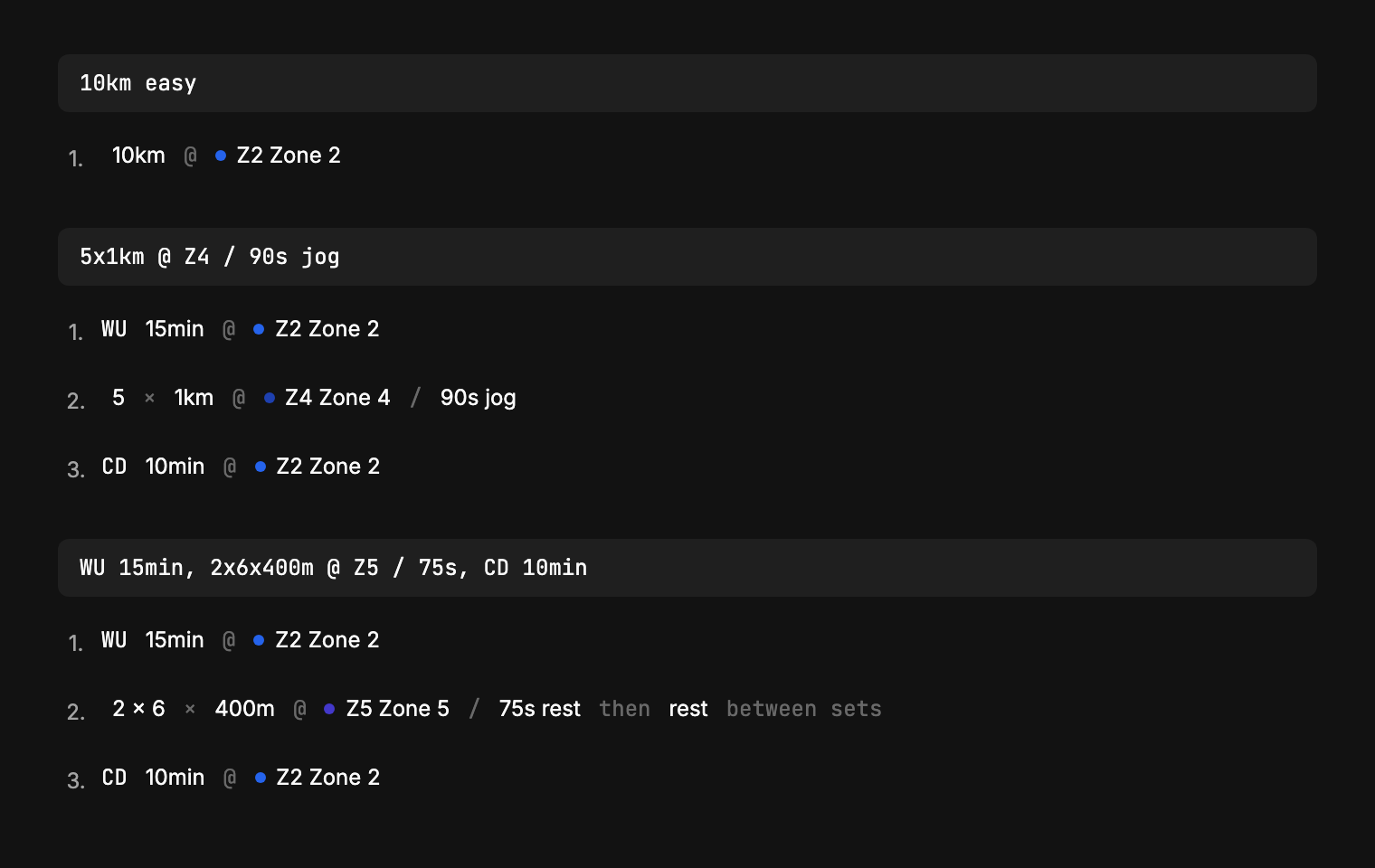
Everything below the line you typed is a segment you can adjust, and the warmups, zones and recoveries you did not write are the defaults filled in for you.
Add a pace and a recovery with @ and /:
5x1km @ Z4 / 90s
That reads: five 1 km reps at zone 4 with 90 seconds recovery. Both parts are optional. Leave either out and Runtool fills in a sensible default (see What Runtool fills in).
Sets of intervals
A second multiplier groups reps into sets:
2x6x400m @ Z5 / 75s: 2 sets of 6 × 400 m
Blocks with changing pace
Parentheses group segments that run back to back, separated by +. A recovery after the closing parenthesis applies between rounds:
3x(4min + 2min) / 2min: three rounds of 4 minutes plus 2 minutes, 2 minutes recovery between rounds5x(4min @ Z3 + 2min @ Z5) / 2min: each segment can carry its own pace
Pyramids and ladders
A dash-separated list in parentheses repeats the same rep with changing counts:
(5-4-3)x300m @ Z5 / 90s: expands to5x300m, 4x300m, 3x300m, each at Z5 with 90 s recovery(3-4-5-4-3)x200m: a full pyramid
Paces and efforts
There are six ways to say how fast, and the @ is optional in all of them (10km easy and 10km @ easy are the same). All six, and what each one means, are on the Intensity page.
Zones: Z1 through Z6, as defined on the Zones page. Z7 and above are rejected.
Effort words: plain words that name a zone:
| Words | Zone |
|---|---|
easy, recovery, reco | Z1 |
steady | Z2 |
tempo | Z3 |
threshold | Z4 |
hard, fast, intervals | Z5 |
sprint, strides | Z6 |
If you have renamed a zone under Settings → Zones, your name works here too.
RPE: @ RPE 7, from 1 to 10, or a band with @ RPE 6-7. Either order reads, so @ 7rpe and @ 6-7rpe work too. The word itself is required, because a bare @ 7 could be a pace or a rep count. The rating is kept as a rating: the segment reads back as RPE 7, never as a zone or a pace.
Named thresholds: @ LT1, @ LT2, @ vVO2max. These target the threshold itself rather than the band around it, so 20min @ LT2 is faster than 20min @ Z4.
Absolute pace: MM:SS, optionally with a unit: @ 4:30 (per km when no unit is given), @ 4:30/km, @ 7:15/mi.
Target time per rep: a time range after the rep, for track work: 20x400m, 1:20-1:22 targets each 400 m in 1:20–1:22.
Recovery
Recovery comes after a /:
- By time:
10x400m / 90s: timed rest between reps - By distance:
8x1km / 200m: a 200 m jog between reps - The word
rorrestbefore the value is accepted:/ r 60s
Add jog, walk, or rest after the value to say how the recovery is taken: 10x400m / 90s jog, 6x800m / 400m walk. Left out, a timed recovery is standing rest and a measured one is a jog, because you can't cover a distance standing still.
If you write no recovery at all, Runtool adds one based on the rep (table below).
A rest of its own
A measure followed by jog, walk or rest is a segment in its own right, not a rep's recovery: 5min walk, 90s rest, 400m jog. Use it for a break between two efforts that isn't part of either.
Warmup and cooldown
Write them explicitly with WU and CD (or warmup / cooldown), each with a duration or a distance, and an optional pace:
WU 15min, 10x400m @ Z4 / 90s, CD 10min @ Z1
WU 3km @ Z2, 5x1km @ Z4 / 90s jog, CD 2km
WU and CD on their own are the lengths you have set, so WU, 10x400m @ Z4 / 90s, CD is a whole workout:
WU, 10x400m @ Z4 / 90s, CD
Or leave them out: quality workouts (anything with intervals, or a steady run at Z3 or harder) get a warmup and a cooldown added for you. Easy and long runs get neither. Writing your own WU or CD keeps yours instead.
The durations are a per-athlete setting: 15 minutes and 10 minutes unless you change them under Settings → Workout categories, where None turns either off.
What Runtool fills in for you
Everything you leave out gets a default. All of it is visible and editable in the structure before you save.
Recovery, when none is written, depends on the rep:
| Rep | Default recovery |
|---|---|
| Under 200 m | 2:00 |
| 200–600 m | 1:30 |
| 600 m to 1.5 km | 2:00 |
| Over 1.5 km | 1:00 |
| Timed reps up to 3 min | 2:00 |
| Timed reps over 3 min | 1:00 |
Zone, when no pace or effort is written, is inferred from the rep:
| Rep | Inferred zone |
|---|---|
| Under 200 m | Z6 |
| 200–600 m | Z5 |
| 600 m to 1.6 km | Z4 |
| Longer reps | Z4 (Z3 past 10 km total) |
| Timed reps up to 3 min | Z5 |
| 3–8 min | Z4 |
| 8–20 min | Z3 |
| Over 20 min | Z2 |
| Steady runs | Z2 |
Strides and progressive runs
Two additions can hang off the end of a workout:
Strides: short relaxed sprints, 20 seconds each, 6 by default:
45min easy + strides: 6 strides after the run45min easy + 8x strides: pick the count60min including strides: strides inside the run rather than after it
Progressive: a run that speeds up:
40min, progressive: pace rises throughout40min, progressive finish: easy running with a fast finish
Combining segments
Separate segments with commas, newlines, +, or the word then:
WU 15min
20x400m @ Z4 / 90s
CD 10min
is the same workout as WU 15min, 20x400m @ Z4 / 90s, CD 10min.
Typos and live feedback
The input corrects common slips instead of failing:
- Missing unit:
10x400becomes10x400m; numbers under 60 are read as minutes, so5x5becomes5x5min - Missing
/:10x400m 90sbecomes10x400m / 90s - Spacing never matters:
10 x 400 mparses the same as10x400m atis understood but@is the canonical form
Problems the parser cannot fix are underlined as you type: red for errors that block parsing, yellow for things that were auto-corrected, dotted for style hints. Hover an underline to see what to change.
One slip the grammar cannot catch is the wrong unit on a right number: 20x400min is valid notation for twenty reps of four hundred minutes, which is 134 hours of running. A segment is checked against what a day can hold before it joins the workout, so a line like that stays in the row and says 400min per rep, did you mean 400m?. The same check runs on the finished workout: nothing over a day of running, 300km, or 200 reps can be saved, and a workout that is merely long (an 8-hour trail run, 150km) says so once and lets you through.